
Microsoft discontinues Windows 11 companion apps, adds Intune remote lock
Microsoft will discontinue its People, Files, and Calendar Companion apps for Windows 11 on December 16, ending a 14-month experiment in taskbar-based productivity tools. The same update introduces a remote lock feature in Intune for securing lost or stolen devices.

Editor, Lazyfounder
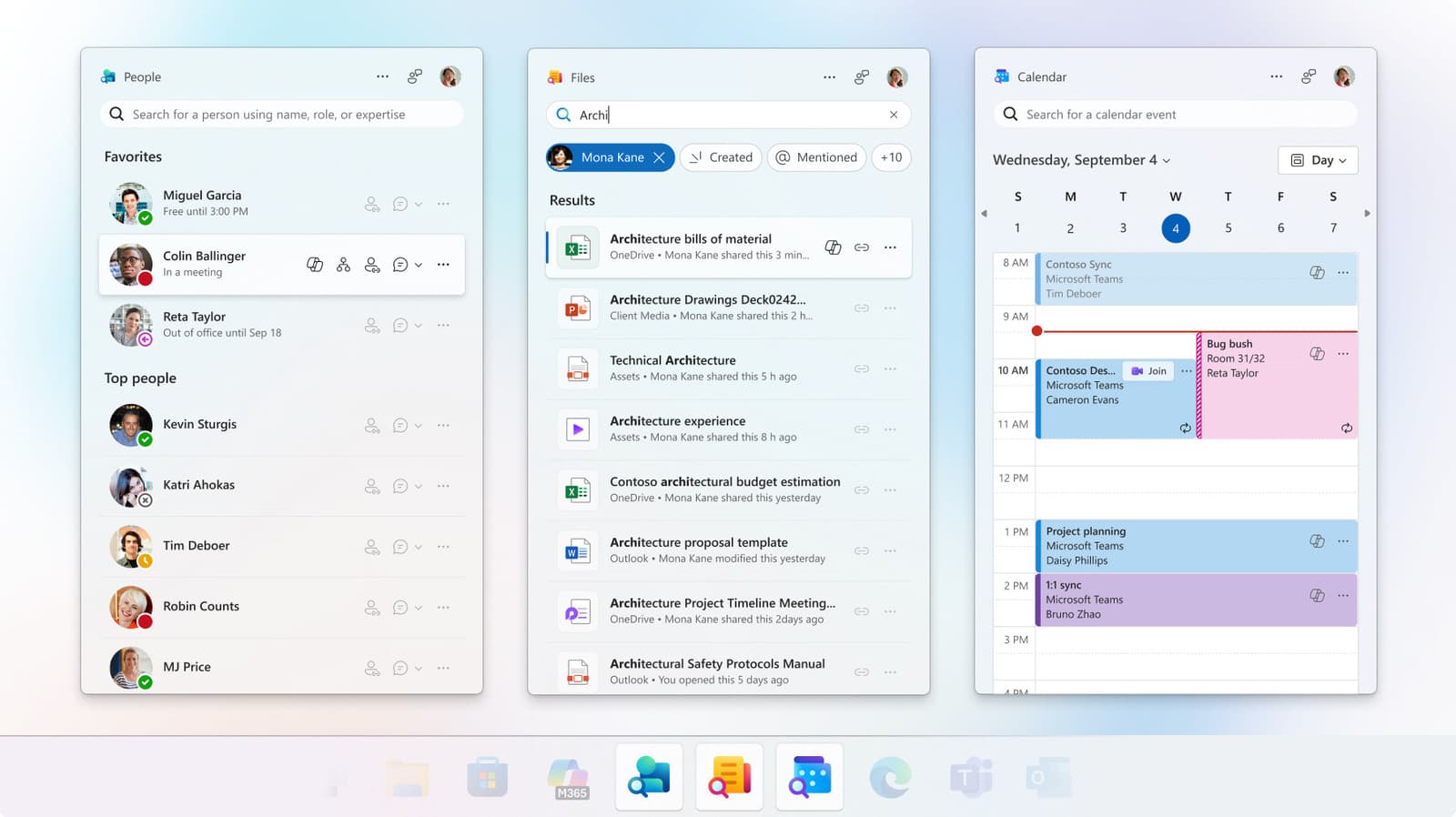
TABLE OF CONTENTS
- Microsoft ends three Windows 11 companion apps
- What the discontinued apps offered
- Why the apps are being discontinued
- How to remove the apps and what to use instead
- Intune gains remote lock for lost or stolen devices
- How the remote lock works and its limitations
- Related shifts in Microsoft’s ecosystem and the broader market
- What this means
- Sources
Microsoft ends three Windows 11 companion apps
Microsoft will retire its People, Files, and Calendar Companion apps for Windows 11 on December 16, just 14 months after their introduction. These apps, automatically deployed to employer-managed Windows 11 devices with commercial Microsoft 365 and Office 365 licenses, will cease functioning on that date.
What the discontinued apps offered
The People app allowed quick access to contacts, org charts, Teams calls, and AI-powered queries via Copilot. Files provided shared-link creation and keyword search for Office documents, while Calendar offered event viewing and editing directly from the taskbar. All three were designed to integrate with Microsoft 365 services like SharePoint Online and Exchange Online.
Why the apps are being discontinued
Microsoft has not explained why it is shutting down the apps. The company’s support post did not address adoption rates, but the apps’ redundancy—mirroring features already available in Outlook, Teams, and OneDrive—may have led to low engagement. Some enterprise IT teams reportedly removed them as unnecessary bloatware.
How to remove the apps and what to use instead
Users can uninstall the apps via Windows Settings under Apps > Installed Apps. Microsoft advises switching to Outlook for calendar and contacts, Teams for messaging and calls, and OneDrive or Windows Search for file access. Data stored in Microsoft 365 cloud services will remain available after uninstallation.
Intune gains remote lock for lost or stolen devices
Microsoft is rolling out a remote lock feature for Windows devices managed through Intune. The lock, which persists across restarts and even offline, can only be removed by an IT admin. It does not erase data, wipe credentials, or prevent alternative boot methods such as Safe Mode or USB recovery.
How the remote lock works and its limitations
The new lock is designed to prevent unauthorized access but does not isolate the device from corporate networks or block advanced recovery techniques. Microsoft advises keeping BitLocker enabled for additional protection until the device is recovered or wiped. Admins can enable the feature in the Intune management center by creating a custom policy under Devices > Windows > Configuration.
Related shifts in Microsoft’s ecosystem and the broader market
The earlier Microsoft 365 outage in November disrupted Outlook, Teams, and Copilot for three days, highlighting the risks of dependency on a single ecosystem. Last year’s wave of AI shutdowns—including Character.ai and Ollie—shows that even well-funded projects can fail if they do not deliver unique value or achieve sufficient adoption.
What this means
Lazyfounder analysis — our interpretation, not reported fact.
Microsoft’s decision to pull the plug on its People, Files, and Calendar Companion apps after just 14 months is a clear signal to enterprise software teams: short-lived point solutions add cost and complexity without delivering lasting value. Operators should audit their own portfolio for redundant tools—especially those tied to narrow scenarios like taskbar companions—and weigh whether consolidation into broader platforms like Teams or Outlook would reduce support overhead and improve adoption. The simultaneous rollout of Intune’s remote lock feature reinforces the trend toward tighter, admin-controlled device security; IT teams should test the new lock workflow now to avoid scrambles when a device next goes missing.
Related on Lazyfounder
Sources
- Engadget · 2026-11-16
Why Microsoft Is Ditching A Few Of Its 365 Companion Apps In 2026 - ZDNET · 2026-11-16
Lost or stolen Windows laptop? IT can lock it down without wiping it now
This story is an original summary drafted with AI by Lazyfounder from the reporting listed above and checked by automated validation. Facts are attributed to their original publishers; sections marked as analysis are Lazyfounder's. Where a source is in another language, facts were machine-translated and quotations are reported, not reproduced. Read the original coverage via the links, and see our AI policy and corrections policy.

About the author
Editor, Lazyfounder
Tarun Mottlia edits LazyFounders, covering Indian startups, funding rounds, AI and product launches. Every story on the site is AI-assisted and checked against its cited sources before publication.
More stories by Tarun MottliaGet the LazyFounder Brief
Startup, funding and AI news in a five-minute read. Join the early-access list.