
What is infill in 3D printing? A guide for founders and operators
Infill is a fundamental concept in FDM/FFF 3D printing, influencing the strength, material efficiency, and print quality of models. While infill density and patterns can be adjusted to optimize performance, resin printers often bypass this step entirely. Here’s what founders and operators need to know about this critical setting.

Editor, Lazyfounder
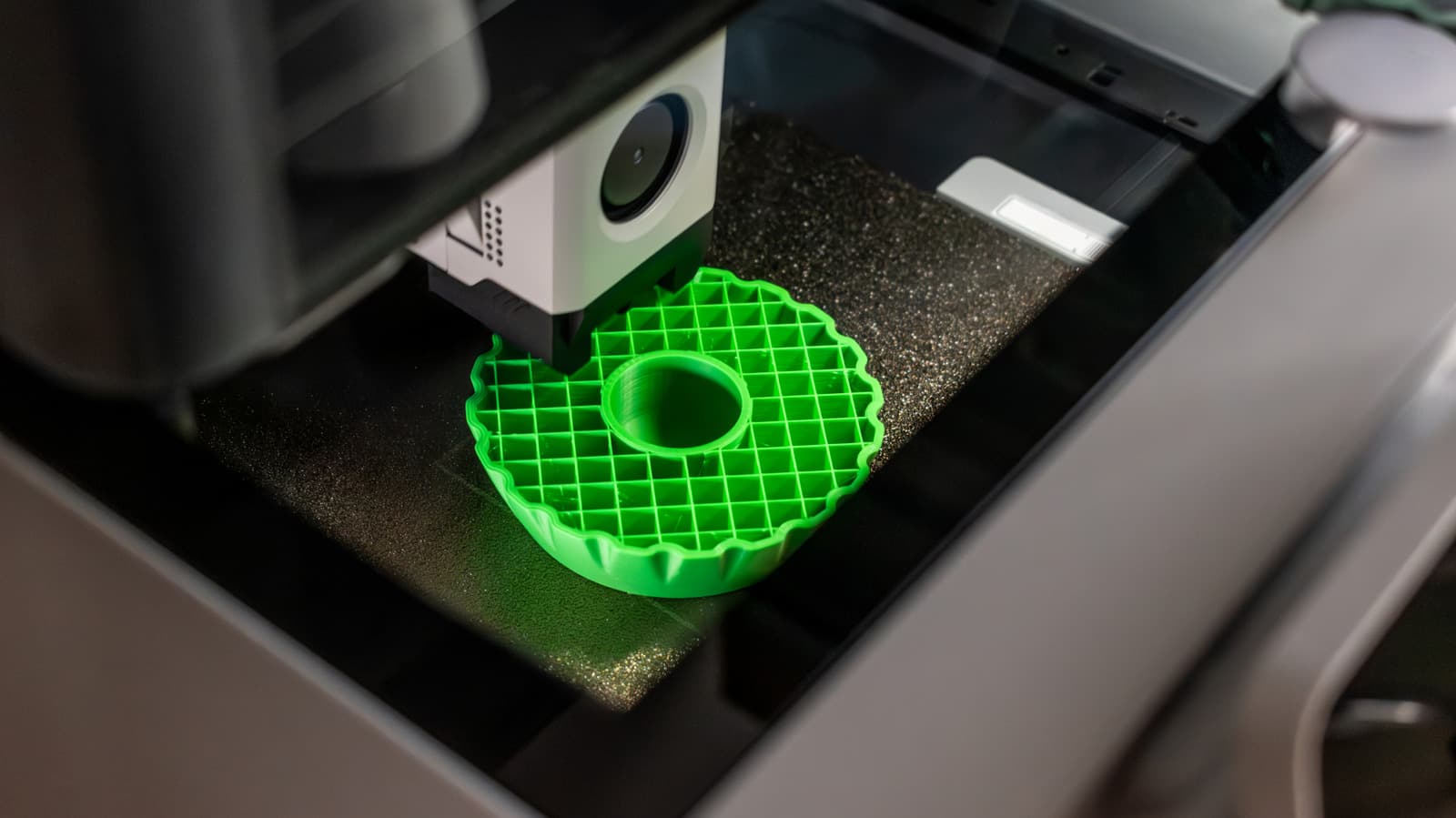
Infill is a fundamental concept in FDM/FFF 3D printing, influencing the strength, material efficiency, and print quality of models. While infill density and patterns can be adjusted to optimize performance, resin printers often bypass this step entirely. Here’s what founders and operators need to know about this critical setting.
30 SEC SUMMARY
- Infill in 3D printing is an internal structure that balances strength and material efficiency in FDM/FFF printing.
- Infill density, measured as a percentage, affects strength, filament use, weight, and printing time.
- Common recommendations for infill density range from 10% to 20% for most use cases, depending on the application.
- Infill patterns like Grid, Cubic, Gyroid, and Lightning optimize for strength or efficiency but are not the only factor in a model’s durability.
- Resin printers typically create solid models unless intentionally hollowed out, skipping infill entirely.
TABLE OF CONTENTS
- What is infill in 3D printing?
- How infill density impacts 3D prints
- Other factors influencing 3D-printed part strength
- Infill patterns and their uses
- What this means
- Key takeaways
- FAQ
- Sources
KEY HIGHLIGHTS
- Infill is an internal structure in FDM/FFF 3D printing that supports layers without excessive filament use.
- Infill density ranges from 0% (hollow) to higher percentages, impacting strength, weight, and printing time.
- Prusa recommends 10-15% infill for most models, while Flashforge suggests 20% as a starting point.
- Infill patterns like Grid, Cubic, and Gyroid optimize for strength or efficiency, depending on the use case.
- Resin printers typically create solid models unless intentionally hollowed, eliminating the need for infill.
What is infill in 3D printing?
Infill refers to the internal structure generated by slicer software in FDM (Fused Deposition Modeling) or FFF (Fused Filament Fabrication) 3D printing. Its primary purpose is to provide support and rigidity to the outer layers of a printed model without using excessive filament. According to Engadget, infill is not required in every 3D-printing process—for example, resin printers typically produce solid models unless they are intentionally designed to be hollow.
How infill density impacts 3D prints
Infill density is measured as a percentage, where 0% results in a completely hollow model, and higher percentages create a denser internal structure. Engadget reports that increasing infill density leads to greater filament consumption, weight, and printing time. It also improves compression resistance, though it is not the only factor determining a part’s overall strength.
For most applications, experts suggest starting with lower infill percentages. Flashforge recommends 20% infill as a general baseline, while Prusa advises 10-15% for typical models. Prusa also notes that infill densities above 30% are rarely necessary and may not provide significant benefits for most use cases.
Other factors influencing 3D-printed part strength
While infill density plays a role in a model’s durability, it is not the sole determinant. According to Engadget, wall thickness, print orientation, and the choice of material also significantly impact the strength and performance of a 3D-printed part. For instance, a model with thick walls but low infill may still be structurally sound.
The shape of the model matters too. Engadget explains that models with a closed bottom can print successfully with 0% infill if they gradually taper toward the top. However, wide flat surfaces may require some infill to prevent sagging or deformation due to insufficient support.
Infill patterns and their uses
Infill patterns determine the geometric structure of the internal fill, and different patterns serve distinct purposes. Common patterns include Grid, Cubic, Gyroid, and Lightning, each optimizing for either strength, material efficiency, or printing speed.
Grid and Cubic patterns are often used for parts requiring rigidity, while Gyroid offers a balance between strength and flexibility. Lightning patterns, on the other hand, are designed to minimize material use and printing time, making them ideal for prototypes or non-functional models.
Choosing the right pattern depends on the application. Founders and operators should consider the trade-offs between strength, material costs, and production speed when selecting an infill pattern for their projects.
What this means
Lazyfounder analysis — our interpretation, not reported fact.
For founders and operators in hardware startups or prototyping-heavy industries, understanding infill is about trade-offs. Infill density and patterns directly impact material costs, production speed, and part performance. While higher infill adds strength and rigidity, it also increases filament usage and printing time—critical factors for scaling production or managing budgets.
The key takeaway is that infill isn’t a one-size-fits-all setting. For most applications, 10-20% infill is sufficient, but startups should experiment with patterns and densities based on their specific needs. For example, a functional prototype might prioritize strength with a Cubic or Gyroid pattern, while a cosmetic model could use a lightweight option like Lightning. Resin printing, which avoids infill entirely, may be better suited for high-detail or solid parts, but it comes with its own material and cost considerations.
Ultimately, mastering infill settings can optimize both performance and cost efficiency—a small but meaningful advantage in competitive or resource-constrained environments.
Key takeaways
- Infill is an internal structure in FDM/FFF 3D printing that provides support and rigidity while balancing filament use.
- Infill density is expressed as a percentage, with 0% creating a hollow model and higher values increasing material use and strength.
- Prusa recommends 10-15% infill for most models, while Flashforge suggests 20% as a general starting point.
- Infill patterns like Grid, Cubic, Gyroid, and Lightning serve different purposes, from strength optimization to material efficiency.
- Resin printers typically produce solid models unless intentionally hollowed, skipping infill entirely.
- For most applications, infill above 30% is rarely necessary and can waste material and time.
FAQ
What is the best infill percentage for 3D printing?
The ideal infill percentage depends on the use case. For most models, Prusa recommends 10-15%, while Flashforge suggests 20% as a starting point. Higher percentages are rarely necessary unless the part requires extra strength.
Does higher infill mean a stronger 3D-printed part?
Higher infill increases compression resistance and rigidity, but strength also depends on wall thickness, print orientation, and material choice. Above 30% infill, the gains in strength may not justify the added material and printing time.
Can you 3D print without infill?
Yes, setting infill to 0% creates a hollow model. This works for shapes with a closed bottom and gradual tapering, but wide flat surfaces may require some infill to prevent sagging.
Why don’t resin printers use infill?
Resin printers typically create solid models unless they are intentionally designed to be hollow. Infill is specific to FDM/FFF printing, where material efficiency and structural support are key considerations.
What infill pattern should I use?
The choice depends on the application. Grid and Cubic patterns are strong but use more material, while Gyroid offers a balance of strength and flexibility. Lightning patterns are optimized for speed and material efficiency.
Related on Lazyfounder
Sources
- Engadget · 2026-10-04
What Is Infill In 3D Printing And Is It Necessary?
This story is an original summary drafted with AI by Lazyfounder from the reporting listed above and checked by automated validation. Facts are attributed to their original publishers; sections marked as analysis are Lazyfounder's. Where a source is in another language, facts were machine-translated and quotations are reported, not reproduced. Read the original coverage via the links, and see our AI policy and corrections policy.

About the author
Editor, Lazyfounder
Tarun Mottlia edits LazyFounders, covering Indian startups, funding rounds, AI and product launches. Every story on the site is AI-assisted and checked against its cited sources before publication.
More stories by Tarun MottliaGet the LazyFounder Brief
Startup, funding and AI news in a five-minute read. Join the early-access list.
