
How to Reduce Spam Calls on iPhone and Android Using Built-In Tools
Spam calls continue to plague mobile users, but both iPhone and Android offer built-in tools to filter, silence, or screen unwanted calls. While no solution is foolproof, understanding these features can significantly reduce disruptions.

Editor, Lazyfounder
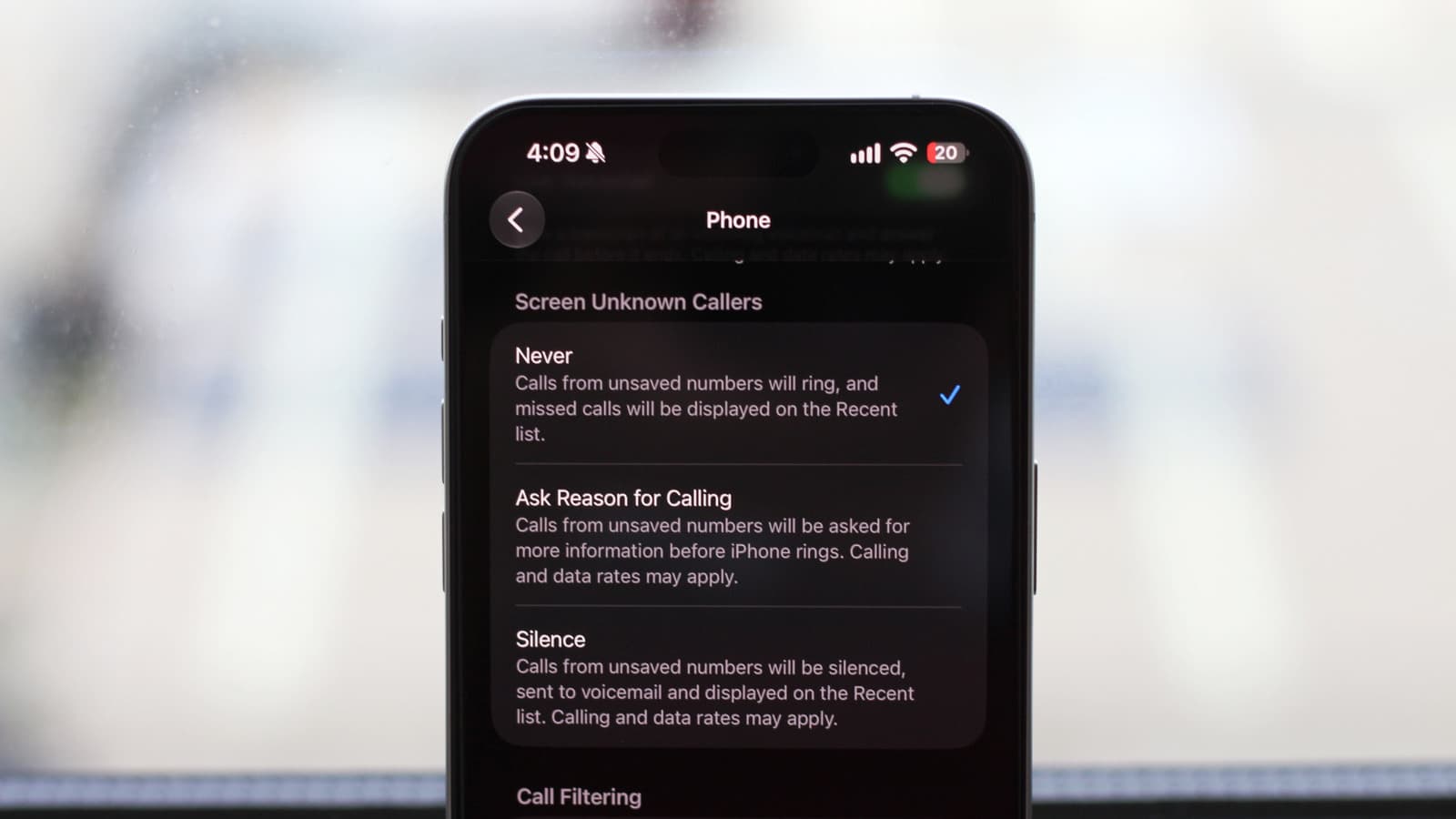
Spam calls continue to plague mobile users, but both iPhone and Android offer built-in tools to filter, silence, or screen unwanted calls. While no solution is foolproof, understanding these features can significantly reduce disruptions.
30 SEC SUMMARY
- Spam calls continue to disrupt mobile users, but both iPhone and Android offer built-in tools to filter or silence them.
- iOS features like Spam Filtering and Silencing Unknown Callers help reduce unwanted calls, though some options are region-locked.
- Android’s spam protection varies by device, but Google’s Phone app provides caller ID and spam detection for most users.
- Carrier services and apps like Truecaller can add an extra layer of protection against spam calls.
- Effective spam management depends on device settings, OS version, and user preferences.
TABLE OF CONTENTS
- How iPhone Users Can Manage Spam Calls
- Android’s Approach to Spam Call Protection
- Additional Tools for Spam Protection
- What this means
- Key takeaways
- FAQ
- Sources
KEY HIGHLIGHTS
- iPhone users can enable Spam Filtering to send junk calls directly to voicemail.
- Silencing unknown callers on iPhone mutes calls from non-contacts and logs them under Unknown Callers.
- iPhone’s Call Screening feature is limited to select countries and requires iOS 26 or newer.
- Most Android phones include spam detection, but features vary by model and Android version.
- Google’s Phone app provides caller ID and spam detection, with enhanced screening on Pixel 6+ and supported Samsung devices.
How iPhone Users Can Manage Spam Calls
According to Engadget, iPhone users can reduce spam calls using built-in settings. Enabling the Spam option under Call Filtering sends calls identified as junk directly to voicemail. This feature relies on Apple’s call identification system to flag potential spam.
Another option is silencing unknown callers. When enabled, this setting mutes calls from numbers not saved in contacts and sends them to voicemail. Recent calls from these numbers are grouped under the Unknown Callers section in the call log, keeping the interface tidy.
For users in select countries, iPhones running iOS 26 or newer offer Call Screening. This feature prompts unknown callers to state their reason for calling before the user decides whether to answer. Availability is limited by region and OS version.
Android’s Approach to Spam Call Protection
Engadget reports that most Android phones include some form of spam detection, though the features vary by device model, Android version, and dialer app. Google’s Phone app, available on many Android devices, includes built-in caller ID and spam detection. Users can enable the "See caller and spam ID" option to receive warnings about potential spam calls.
For stronger protection, users can turn on "Filter spam calls," which automatically silences suspected junk calls. This feature requires Android 6.0 or newer to function. However, not all Android devices support these tools, and some manufacturers replace Google’s Phone app with their own dialer software.
Enhanced call screening is available on Pixel 6 and newer devices, as well as supported Samsung phones. These tools allow users to screen calls in real time, similar to iPhone’s Call Screening feature.
Additional Tools for Spam Protection
Beyond built-in features, third-party apps like Truecaller offer additional layers of spam protection. According to Engadget, Truecaller has long provided caller identification and spam filtering services, which can complement device-level settings.
Carriers may also offer spam protection features, some of which are enabled by default. Users can check their carrier’s settings or support documentation to explore these options. However, effectiveness varies depending on the carrier and region.
What this means
Lazyfounder analysis — our interpretation, not reported fact.
Spam calls are more than just an annoyance—they disrupt productivity, expose users to scams, and erode trust in phone communication. While neither iOS nor Android can eliminate spam entirely, their built-in tools provide practical ways to mitigate the problem. The challenge for users is navigating the fragmentation: iPhone’s features are consistent but tied to region and OS version, while Android’s capabilities depend on the device, manufacturer, and dialer app.
For founders and operators, this situation highlights a broader lesson about platform dependency. Relying solely on OS-level solutions may leave gaps in user protection, especially for teams working across multiple markets or devices. Third-party apps like Truecaller demonstrate the opportunity for specialized tools to fill these gaps, but they also introduce trade-offs in privacy and cost.
The silver lining? Users have more control than they might realize. The key is understanding the tools available and tailoring them to individual or team needs—whether that’s silencing unknown callers, screening calls in real time, or leveraging carrier services. For startups, this is a reminder that even mundane pain points like spam calls can become competitive differentiators if addressed thoughtfully.
Key takeaways
- Spam calls remain a widespread issue for mobile users across platforms.
- Both iOS and Android include built-in features to filter or silence spam calls, but capabilities vary by device and region.
- iPhone users can enable Spam Filtering, Silence Unknown Callers, and Call Screening (in select countries).
- Android’s spam protection depends on the device model, Android version, and dialer app, with Google’s Phone app offering robust tools.
- Carrier services and third-party apps like Truecaller can complement built-in features for enhanced spam protection.
FAQ
Why can’t my iPhone screen calls like some Android phones?
iPhone’s Call Screening feature is only available in select countries and requires iOS 26 or newer. If you’re outside these regions or on an older OS version, the feature won’t be accessible.
Does silencing unknown callers on iPhone block all spam?
No. Silencing unknown callers only mutes calls from numbers not saved in your contacts. Spam calls from numbers not flagged as unknown or junk may still come through.
Why doesn’t my Android phone have spam detection?
Spam detection features depend on the device model, Android version, and dialer app. Some manufacturers replace Google’s Phone app with their own software, which may not include these tools. Check if Google’s Phone app is compatible with your device.
Are third-party spam apps like Truecaller safe to use?
Third-party apps can be effective but may require access to your contacts, call logs, or other sensitive data. Review permissions carefully and consider the trade-offs between convenience and privacy.
Can carriers stop spam calls entirely?
Carriers can help reduce spam calls but rarely eliminate them entirely. Their tools vary by provider and region, so effectiveness depends on their infrastructure and partnerships with spam databases.
Related on Lazyfounder
Sources
- Engadget · 2026-10-06
How To Help Stop Spam Calls On iPhone And Android
This story is an original summary drafted with AI by Lazyfounder from the reporting listed above and checked by automated validation. Facts are attributed to their original publishers; sections marked as analysis are Lazyfounder's. Where a source is in another language, facts were machine-translated and quotations are reported, not reproduced. Read the original coverage via the links, and see our AI policy and corrections policy.

About the author
Editor, Lazyfounder
Tarun Mottlia edits LazyFounders, covering Indian startups, funding rounds, AI and product launches. Every story on the site is AI-assisted and checked against its cited sources before publication.
More stories by Tarun MottliaGet the LazyFounder Brief
Startup, funding and AI news in a five-minute read. Join the early-access list.
