
Movavi Video Editor 27 launches with AI-powered templates and subscription pricing
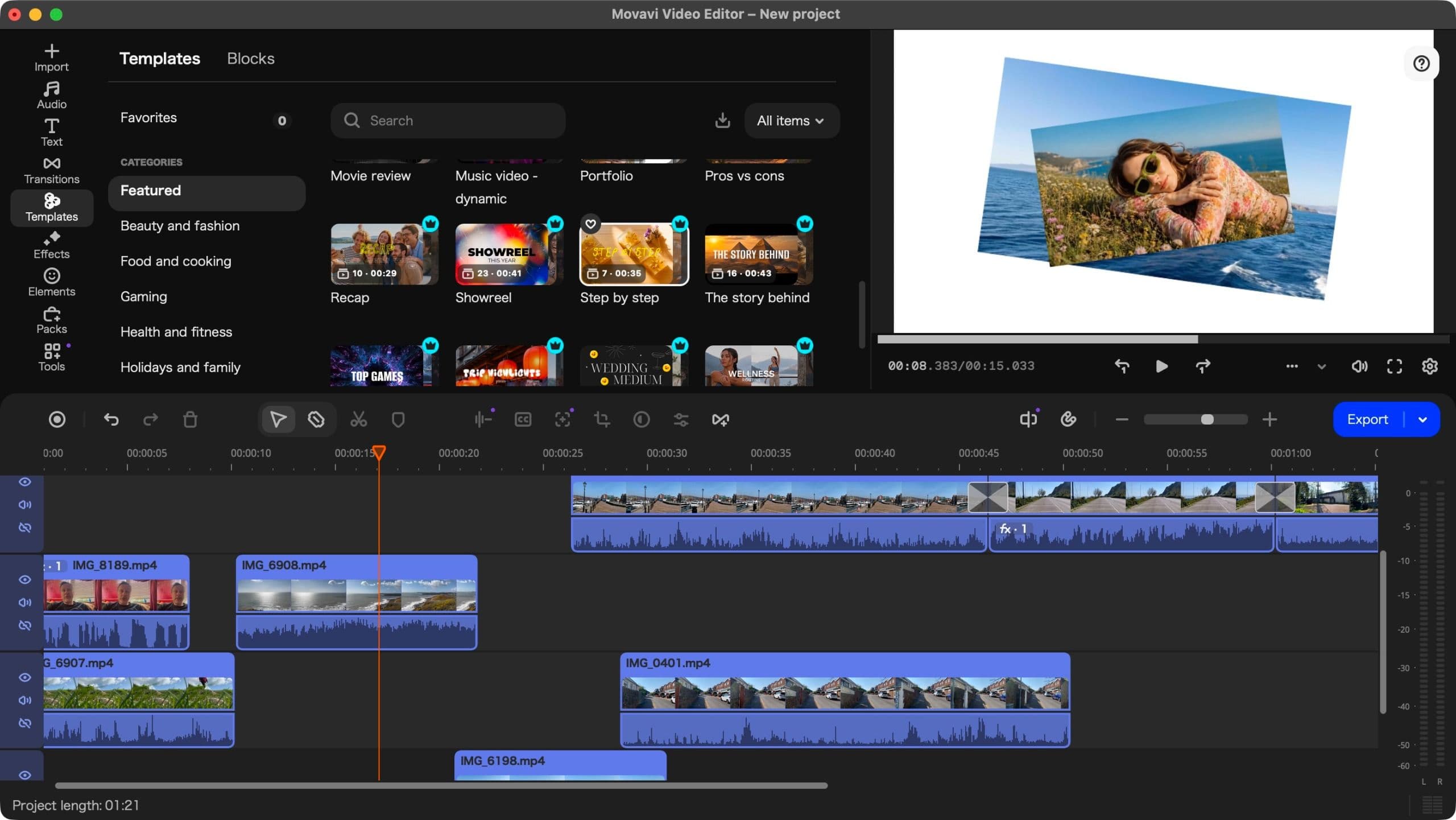
Movavi has released Video Editor 27, its latest multi-platform video editing software, featuring a new 'Templates' tool designed to speed up workflows. The update maintains affordability but locks some premium features behind an additional subscription, while including AI-based tools like subtitles and image stabilization in its base cost.

Editor, Lazyfounder
30 SEC SUMMARY
- Movavi Video Editor 27 launches with a new 'Templates' feature for faster, customizable video editing.
- Subscription prices start at $20/month or $55/year, with a perpetual license available for $90–£150.
- Many premium features and templates require an additional subscription costing €36/month or €110/year.
- Free trial includes a 60-second project limit and a watermark on output.
- AI-based tools like subtitles, image stabilization, and background removal are included in the base cost.
KEY HIGHLIGHTS
- Movavi Video Editor 27 introduces a 'Templates' feature to improve customization and efficiency.
- Subscription pricing: $20/month or $55/year (USD), €19/month or €44/year (EUR), £18/month or £41/year (GBP).
- Perpetual license available for $90, €90, or £150, with notable currency discrepancies.
- Software defaults to Japanese on first launch, regardless of OS language settings.
- Premium features and templates require an additional €36/month or €110/year subscription.
- Free trial limits projects to 60 seconds and adds a watermark to output.
What’s new in Movavi Video Editor 27
Movavi Video Editor 27 introduces a 'Templates' feature aimed at improving customization and efficiency for users. The update retains multi-platform support for Windows and Mac and adds AI-based tools like subtitles, image stabilization, and background removal at no extra cost in the base version.
According to TechRadar, the new templates are versatile but many premium options require an additional subscription costing €36 per month or €110 per year. The base subscription is priced at $20 per month or $55 per year (USD), €19 per month or €44 per year (EUR), and £18 per month or £41 per year (GBP).
A perpetual license is also available for $90, €90, or £150, though the pricing discrepancies across currencies may affect regional adoption.
Limitations and user experience
The software defaults to Japanese upon first launch, regardless of the user’s operating system language settings. This could pose a usability challenge for non-Japanese speakers.
The free trial version limits projects to 60 seconds and adds a watermark to the output, which may restrict its utility for testing larger projects. Users seeking full functionality will need to subscribe or purchase a license.
While Movavi positions itself as a cheaper alternative to Adobe Premiere Pro, which costs $276 per year according to TechRadar, the additional costs for premium features could narrow the price gap for some users.
How it compares to competitors
Movavi Video Editor 27 competes with Adobe Premiere Pro and other professional editing tools by offering lower entry-level pricing. However, the requirement for an additional subscription to access premium templates and features may limit its appeal to users seeking a one-time purchase or all-inclusive pricing.
The software’s inclusion of AI-based tools like subtitles and image stabilization in its base cost could attract creators looking for affordable automation features. Still, the forced language default and free trial limitations may frustrate some users.
What this means
Lazyfounder analysis — our interpretation, not reported fact.
Movavi Video Editor 27 reflects a growing trend in the video editing software market: balancing affordability with feature-rich offerings, but often at the cost of hidden paywalls for premium tools. For founders and operators evaluating editing tools, Movavi presents a viable alternative to industry standards like Adobe Premiere Pro, particularly for budget-conscious users. However, the additional costs for premium features and the free trial limitations could deter professionals working on larger projects or seeking a seamless experience. The pricing discrepancies in perpetual licenses also suggest regional pricing strategies that may influence adoption in different markets.
Key takeaways
- Movavi Video Editor 27 competes directly with Adobe Premiere Pro, offering lower subscription costs but requiring additional payments for premium features.
- The pricing discrepancies in perpetual licenses may influence purchasing decisions based on regional affordability.
- The forced Japanese language default could impact user experience, particularly for non-Japanese speakers.
- Founders and operators evaluating video editing tools may see Movavi as a cost-effective alternative, but the free trial limitations could deter adoption for larger projects.
Related on Lazyfounder
Sources
- TechRadar · 2026-10-26
Movavi Video Editor 27 review
This story is an original summary drafted with AI by Lazyfounder from the reporting listed above and checked by automated validation. Facts are attributed to their original publishers; sections marked as analysis are Lazyfounder's. Where a source is in another language, facts were machine-translated and quotations are reported, not reproduced. Read the original coverage via the links, and see our AI policy and corrections policy.

About the author
Editor, Lazyfounder
Tarun Mottlia edits LazyFounders, covering Indian startups, funding rounds, AI and product launches. Every story on the site is AI-assisted and checked against its cited sources before publication.
More stories by Tarun MottliaGet the LazyFounder Brief
Startup, funding and AI news in a five-minute read. Join the early-access list.
