
Keychron Launches Thunderbolt 5 Dock with Dual 8K Support and 140W Power Delivery
Keychron, a company renowned for its mechanical keyboards, has ventured into the high-end docking market with its Thunderbolt 5 Dock. Priced at $350, the dock offers extensive connectivity, including dual 8K monitor support and 140W power delivery, but skips features like an internal SSD bay. Engadget’s review highlights its build quality and value while noting some trade-offs.
Editor, LazyFounders
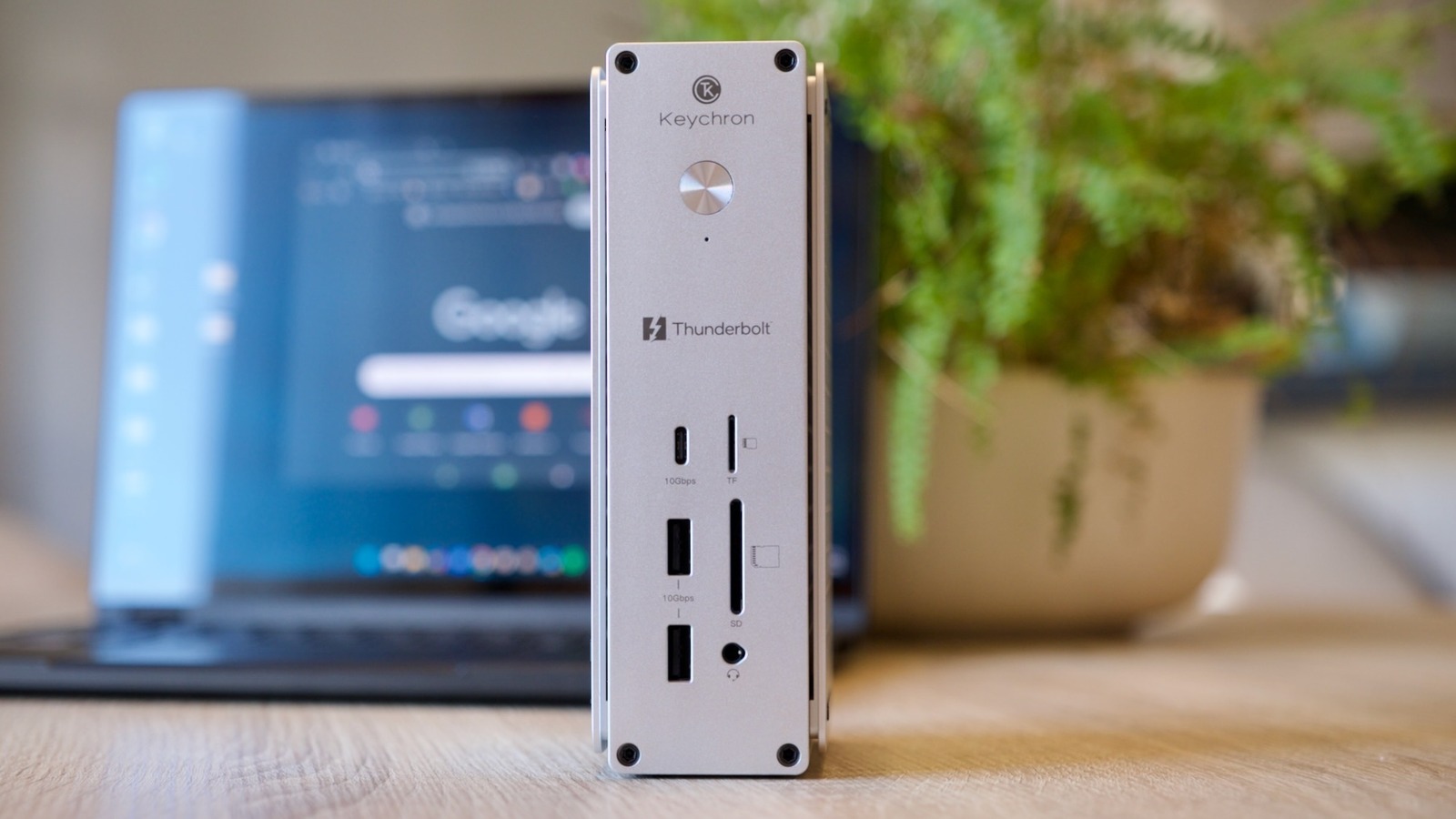

Keychron, a company renowned for its mechanical keyboards, has ventured into the high-end docking market with its Thunderbolt 5 Dock. Priced at $350, the dock offers extensive connectivity, including dual 8K monitor support and 140W power delivery, but skips features like an internal SSD bay. Engadget’s review highlights its build quality and value while noting some trade-offs.
30 SEC SUMMARY
- Keychron, known for mechanical keyboards, has launched its Thunderbolt 5 Dock, a high-end docking station for professionals and creatives.
- The dock supports 80Gbps data transfers, dual 8K monitor output, and 140W power delivery across 14 ports.
- Priced at $350, it undercuts competitors like CalDigit ($399) and Razer ($379) but lacks features like an SSD bay or DisplayPort.
- MacOS users may face limitations with dual HDMI setups due to native OS restrictions.
- The dock received an 8.3/10 rating from Engadget, praised for its build quality and connectivity.
TABLE OF CONTENTS
- Keychron Expands into High-End Docking
- Connectivity and Design
- Pricing and Competition
- Background: High-End Docking Solutions
- What this means
- Key takeaways
- FAQ
- Sources
KEY HIGHLIGHTS
- Keychron launches Thunderbolt 5 Dock with 80Gbps data transfer and 120Gbps boost mode.
- Dock supports dual 8K monitors, 140W power delivery, and 14 ports including dual HDMI and Thunderbolt 5.
- Priced at $350, it is cheaper than competitors like CalDigit ($399) and Razer ($379).
- MacOS users may face limitations with dual HDMI setups due to native OS restrictions.
- Engadget rated the dock 8.3/10, highlighting build quality and connectivity as strengths.
Keychron Expands into High-End Docking
Keychron, a company best known for its mechanical keyboards, has launched its Thunderbolt 5 Dock, targeting professionals and creatives who require robust connectivity solutions. According to Engadget, the company has previously expanded its product philosophy into other peripherals, such as mice, with notable success.
The Thunderbolt 5 Dock is designed to deliver comprehensive connectivity, leveraging Intel’s Thunderbolt 5 interface. It supports 80Gbps data transfers, with a 120Gbps boost mode for demanding tasks like 8K video editing or large file transfers. The dock also includes 140W upstream power delivery, making it suitable for charging high-performance laptops.
Connectivity and Design
The dock features 14 ports, including three Thunderbolt 5 ports (one upstream and two downstream), two HDMI outputs, and three USB 3.2 (Gen 2) ports supporting 10Gbps data transfer. It also includes two SD card slots—one full-size and one MicroSD—and a 3.5mm jack with inline mic support for calls and basic audio input.
A standout feature is its dual HDMI ports, which allow for multi-display setups. The dock can support up to four displays simultaneously when combining HDMI and Thunderbolt outputs. However, MacOS users may encounter limitations, as the operating system does not natively support multiple displays over HDMI hubs or splitters. The HDMI outputs are also capped at 4K/60Hz.
The Thunderbolt 5 Dock is built with brushed aluminum and features a design inspired by Apple’s aesthetic. It can be positioned upright or flat, thanks to rubber feet on two sides. CNC-cut panels on the sides act as heatsinks, eliminating the need for a fan and ensuring silent operation.
Pricing and Competition
Priced at $350, the Thunderbolt 5 Dock is positioned below competitors like CalDigit’s TS5 ($399) and Razer’s Thunderbolt 5 Dock Chroma ($379). While it lacks features like an internal SSD bay or DisplayPort connectivity, it stands out for its dual HDMI ports, which are rare in this price range.
Engadget’s reviewer gave the dock an 8.3/10, praising its build quality, connectivity, and value for money. However, they noted that the absence of DisplayPort could be a drawback for some users. Anker’s Prime TB5 dock, another competitor, matches Keychron’s connectivity but swaps the second HDMI port for DisplayPort.
Background: High-End Docking Solutions
High-end docking stations have become essential for professionals and creatives who rely on multiple peripherals, external displays, and fast data transfers. Thunderbolt 5, the latest iteration of Intel’s connectivity standard, offers significant improvements in bandwidth and power delivery, making it a preferred choice for premium docking solutions.
Companies like CalDigit, Razer, and Anker dominate this space, often catering to users of high-performance laptops and workstations. Features like SSD bays, multiple display outputs, and high wattage power delivery are common selling points, though pricing can vary widely depending on the feature set.
What this means
LazyFounders analysis — our interpretation, not reported fact.
Keychron’s entry into the high-end docking market is a notable shift for a company primarily known for mechanical keyboards. The Thunderbolt 5 Dock’s pricing and feature set suggest it is targeting cost-conscious professionals who still demand premium connectivity. Its dual HDMI ports are a unique selling point, but the absence of DisplayPort or an SSD bay may limit its appeal to power users who rely on those features.
For MacOS users, the dock’s limitations with dual HDMI setups could be a dealbreaker, especially if they require seamless multi-display functionality. However, its competitive pricing and solid build quality make it a compelling option for Windows users or those who prioritize Thunderbolt connectivity over other features.
Keychron’s ability to undercut established competitors while maintaining high standards for build quality and performance could shake up the market. If the company continues to expand its peripheral lineup with the same philosophy, it may carve out a niche as a value-driven alternative to brands like CalDigit and Razer.
Key takeaways
- Keychron’s Thunderbolt 5 Dock enters the high-end docking market with a focus on connectivity and affordability.
- The dock’s dual HDMI ports are a standout feature but may not fully benefit MacOS users.
- Pricing and build quality position it competitively against established brands like CalDigit and Razer.
- Thunderbolt 5’s 120Gbps boost mode and 140W power delivery cater to power users and creatives.
- Limitations like the absence of an SSD bay or DisplayPort may deter some professionals.
FAQ
What is the Keychron Thunderbolt 5 Dock’s price?
The dock is priced at $350, making it cheaper than competitors like CalDigit’s TS5 ($399) and Razer’s Thunderbolt 5 Dock Chroma ($379).
How many displays can the Thunderbolt 5 Dock support?
The dock can support up to four displays simultaneously when combining HDMI and Thunderbolt outputs. However, MacOS users may face limitations with dual HDMI setups.
Does the Thunderbolt 5 Dock include an SSD bay?
No, the dock does not include an internal SSD bay, which may be a drawback for users who require expandable storage.
What are the key limitations of the Thunderbolt 5 Dock?
The dock lacks DisplayPort connectivity and an internal SSD bay. Additionally, MacOS users may experience limitations with dual HDMI setups due to native OS restrictions.
How does the Thunderbolt 5 Dock compare to competitors?
The dock is priced lower than competitors like CalDigit and Razer but offers unique features like dual HDMI ports. However, it lacks some premium features like an SSD bay or DisplayPort.
Related on LazyFounders
Sources
- Engadget · 2026-09-25
Keychron Thunderbolt 5 Dock Review: Unusually Sensible
This story is an original summary drafted with AI by LazyFounders from the reporting listed above and checked by automated validation. Facts are attributed to their original publishers; sections marked as analysis are LazyFounders's. Where a source is in another language, facts were machine-translated and quotations are reported, not reproduced. Read the original coverage via the links, and see our AI policy and corrections policy.
Get the LazyFounder Brief
Startup, funding and AI news in a five-minute read. Join the early-access list.
